



SRM proteomics names selected reaction monitoring (SRM) used as a targeted proteomics study class: a closed peptide panel, matched pretreatment, and scheduled precursor-to-product transitions on liquid chromatography-tandem mass spectrometry (LC-MS/MS) (Lange et al. 2008). In project language, SRM and multiple reaction monitoring (MRM) describe the same transition logic. Parallel reaction monitoring (PRM) stores a high-resolution product-ion spectrum for post-acquisition fragment review (Peterson et al. 2012). The guide below integrates SRM proteomics with workflow, locked parameters, limits, and project fit. It is not a clinical oncology catalog, not a drug-efficacy brochure, and not a claim that instrument sensitivity alone solves peptide interference.
SRM proteomics tables support relative change of the same peptide across frozen groups. Amount on named peptides needs stable isotope-labeled internal standard (SIS) peptides and a calibration model in the study matrix (Gerber et al. 2003). Protein inference still depends on proteotypic uniqueness and digest mapping (Bantscheff et al. 2012). Biomarker or therapeutic-efficacy language needs separate validation design beyond the quantitative table.
In MtoZ Biolabs targeted offerings, SRM proteomics methods are built when the peptide list is closed and matrix-matched transition pilots support the cohort block. Service intake appears in SRM-MRM Quantitative Proteomics Services.
What SRM Proteomics Covers as a Study Class
Four study layers belong in the brief and stay separated.
Panel layer freezes proteotypic peptides mapped to each target protein or site. Digests can yield many fragments. Only peptides that survive uniqueness and matrix interference checks enter the inclusion list.
Detection layer isolates each precursor, fragments it, and passes prechosen product ions for each dwell on a triple quadrupole.
Informatics layer covers peak integration, transition-ratio review, normalization or SIS calibration, and statistics on predefined contrasts only.
Claim layer states relative peptide change, or calibrated amount when SIS and a curve are declared. Disease, prognosis, or drug-response wording is not automatic from an SRM file.
SRM proteomics remeasures a frozen shortlist. It does not replace discovery nomination of unnamed proteins.
Peptide Selection, SRM Versus MRM Naming, and Route Alternatives
Peptide choice and scan mode should be decided independently.
Proteotypic selection is the first failure point in SRM proteomics. Peptides that look clean in a neat digest can fail after cleanup when co-eluting ions share transitions. Matrix-matched pilots decide which peptides stay on the list.
SRM and MRM naming are interchangeable in many briefs. The record should lock one name and one transition list version.
PRM fits when candidate peptides remain unstable after collision-energy and cleanup work, so fragments can be reviewed after acquisition (Gallien et al. 2012). Route choice after matrix pilot appears in Parallel Reaction Monitoring vs MRM: Which Fits?.
Discovery label-free quantification (LFQ) or data-independent acquisition (DIA) profiles an open or semi-open proteome. SRM proteomics starts after candidates are named and versioned. Targeted SRM method language appears in Targeted Quantitative Proteomics SRM.
End-to-End Workflow for an SRM Proteomics Project
A practical SRM proteomics spine usually runs as follows.
- Freeze contrast, replicates, and relative versus amount claim.
- Nominate proteotypic peptides and map each to its protein or site.
- Match extraction, digest, and load across all contrast arms.
- Run matrix-matched transition pilots; drop peptides that fail uniqueness or ratio rules.
- Lock dwell schedule, retention windows, and cycle time versus peak width.
- Size biological n plus quality control (QC), blanks, and SIS if used.
- Acquire interleaved study and QC injections when cohort size allows.
- Integrate transitions; review ratios and retention drift against locked rules.
- Test predefined contrast only; archive peptide panel version, transition list, and software with deliverables.
Steps 1 through 4 protect the proteomics panel. Steps 5 through 9 produce the quantitative record.
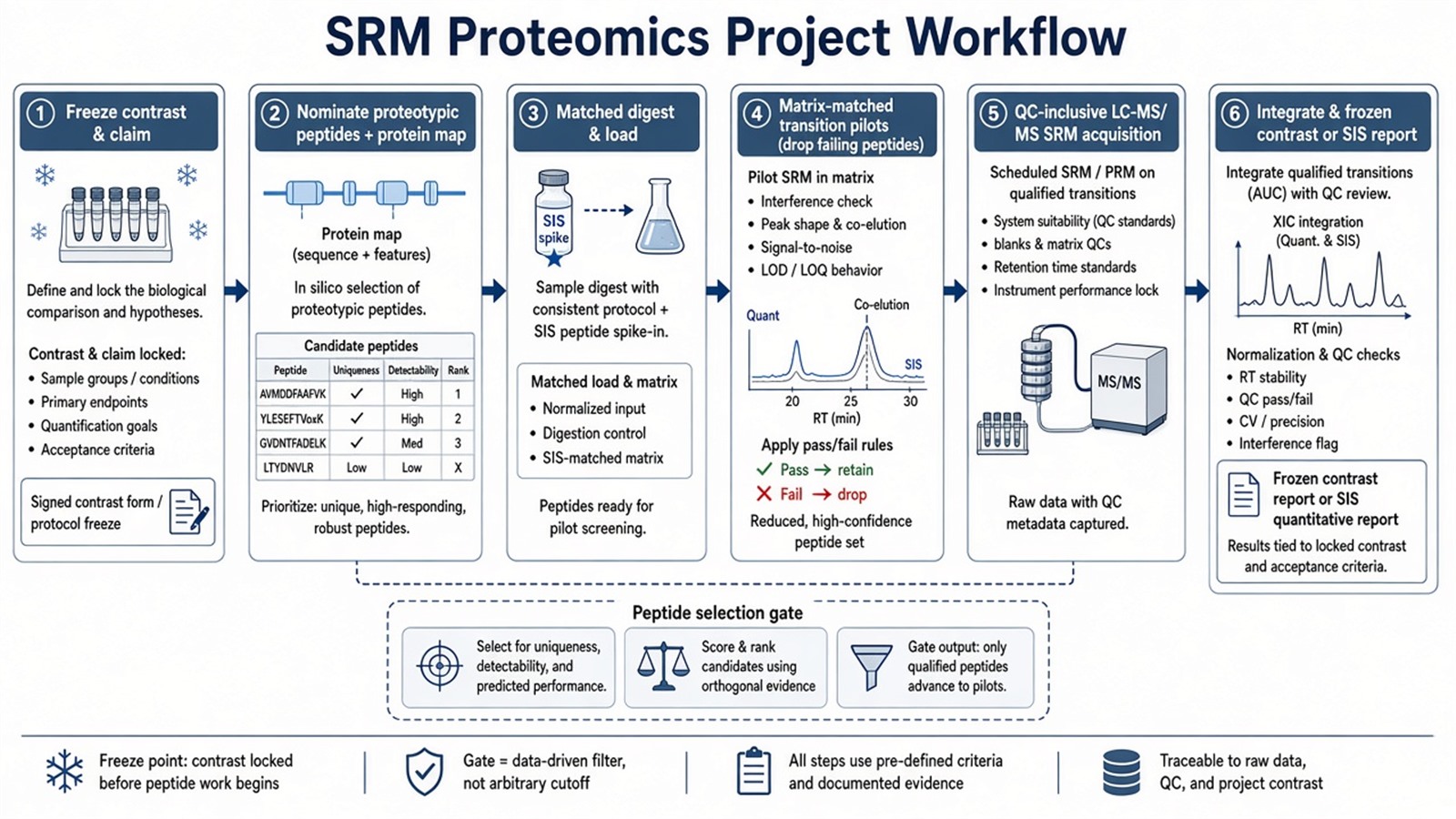
Figure 1. SRM proteomics comparability depends on a versioned proteotypic panel and matrix-matched transitions before group contrasts are tested.
Parameters That Must Be Locked in SRM Proteomics
Layer |
Parameter that must be declared |
Failure mode if ignored |
|---|---|---|
Panel |
Proteotypic peptide list version and protein mapping |
Moving targets mid cohort |
Uniqueness |
Shared-sequence and interference checks |
Wrong protein assigned to a peak |
Transitions |
Precursor, products, dwell, collision energy |
Neat-standard methods fail in matrix |
Schedule |
Cycle time versus peak width |
Undersampled or missed peaks |
Prep |
Matched extraction and digest |
Peptide-pool shift as biology |
Load |
Mass on column from pilot |
Saturation or dropped transitions |
SIS |
Spike step aligned to claim |
Relative peaks read as concentration |
QC |
Pools, blanks, and bracket pattern |
Undetected batch drift |
Contrast |
Frozen before peak review |
Post hoc arm relabeling |
Deliverable |
Table, panel version, transition list |
Report rebuilt after acquisition |
Limits follow the same table. SRM proteomics does not remove matrix suppression. Instrument sensitivity claims do not replace peptide selection pilots. Discovery identification of a peptide does not prove SRM quantifiability after cleanup. Clinical diagnosis, disease progression, or pharmaceutical efficacy language needs separate study design beyond the SRM table.
How to Choose SRM Proteomics Versus Other Routes
Use list status, peptide pilot outcome, claim unit, and interference evidence together.
Project need |
Route that often fits |
Recheck before committing |
|---|---|---|
Closed proteins, clean proteotypic transitions |
SRM or MRM proteomics |
Discovery LFQ as the targeted table |
Candidate peptides fail matrix ratio rules |
PRM subset or hybrid panel |
Keep failed peptides on the SRM list |
Open proteome relative profiling |
Discovery LFQ or DIA first |
SRM on unnamed proteins |
Amount on named peptides |
SRM or PRM with SIS and curve |
Relative peaks as concentration |
Transferred SRM method, same matrix |
Acquisition plus QC |
Assume free panel rebuild |
Biomarker or drug-response intent |
Targeted panel plus validation design |
SRM table as clinical or efficacy test |
Intact-protein or epitope claim |
Not peptide SRM alone |
Bottom-up surrogate as intact amount |
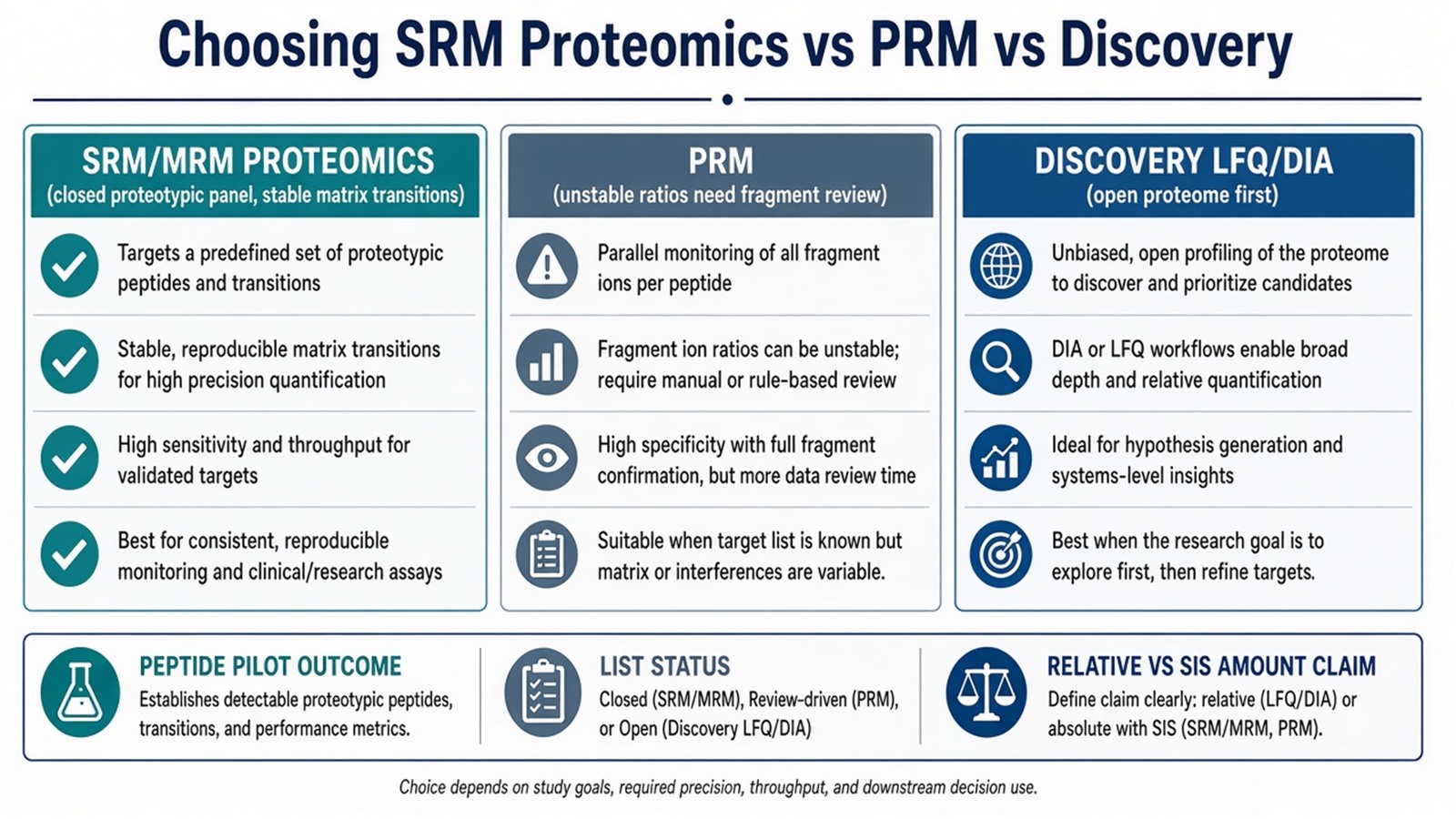
Figure 2. Choose SRM proteomics when a versioned proteotypic panel is stable in matrix; use PRM or discovery when peptide selection or list status changes the need.
Teams with proteotypic panel drafts, contrast maps, and matrix notes can review MtoZ Biolabs SRM-MRM Quantitative Proteomics Services when those fields are declared in the project record.
Frequently Asked Questions
1. Is SRM proteomics the same as MRM proteomics?
In most targeted proteomics briefs, yes. Both name scheduled precursor-product monitoring on triple quadrupole LC-MS/MS. The record should lock one name and one peptide panel version.
2. Why does peptide selection matter more than sensitivity slogans?
Digests create many fragments. Only proteotypic peptides that survive matrix-matched transition checks support protein-level claims. Sensitivity without uniqueness still yields ambiguous peaks.
3. Can SRM proteomics replace discovery quantitative proteomics?
No. Discovery nominates candidates. SRM proteomics measures a frozen shortlist. Mixing those intents on one file splits the analysis record.
4. Must every SRM proteomics project use SIS peptides?
No. Relative contrasts can run light-only when that claim is declared. SIS and a curve become necessary when amount units are required.
5. When should projects move from SRM proteomics to PRM?
When matrix-matched pilots still show unstable transition ratios after peptide filtering and collision-energy work, a PRM subset can be scoped.
MtoZ Biolabs can discuss SRM proteomics scoping when peptide panel, pretreatment parity, and contrast design are documented.
If further evaluation of SRM versus PRM, SIS calibration, or discovery-to-targeted handoff is needed, project details can be submitted for a feasibility review.
Reference
- V. Lange, P. Picotti, B. Domon, R. Aebersold (2008). Selected reaction monitoring for quantitative proteomics: a tutorial. Mol. Syst. Biol., 4, 222. https://doi.org/10.1038/msb.2008.61
- A.C. Peterson, J.D. Russell, A.A. Klammer, P.F. Doubleday, H. Liu, J.N. Anderson, M.J. MacCoss (2012). Parallel reaction monitoring for high resolution and high mass accuracy quantitative, targeted proteomics. Mol. Cell. Proteomics, 11, 1475-1488. https://doi.org/10.1074/mcp.O112.020271
- S.A. Gerber, J. Rush, O. Stemman, M.W. Kirschner, S.P. Gygi (2003). Absolute quantification of proteins and phosphoproteins from cell lysates by tandem MS. Proc. Natl. Acad. Sci. U.S.A., 100, 6940-6945. https://doi.org/10.1073/pnas.0832254100
- M. Bantscheff, S. Lemeer, H.U. Haab, B. Kuster (2012). Quantitative mass spectrometry in proteomics: a critical review. Anal. Bioanal. Chem., 404, 939-965. https://doi.org/10.1007/s00216-012-5892-4
- S. Gallien, E. Duriez, A. Crone, M. Kellmann, T. Moehring, T. Domon (2012). Targeted proteomic quantification on quadrupole-orbitrap mass spectrometers. Mol. Cell. Proteomics, 11, 1709-1723. https://doi.org/10.1074/mcp.O112.019232
