



Single Reaction Monitoring
Quantitative proteomics projects often arrive under the search term single reaction monitoring. In mass spectrometry language, the established name is selected reaction monitoring (SRM): a triple quadrupole method that records predefined precursor-to-product transitions on liquid chromatography-tandem mass spectrometry (LC-MS/MS) (Lange et al. 2008). Multiple reaction monitoring (MRM) uses the same scheduled transition logic. Both sit inside a larger quantitative proteomics map that also includes label-free quantification (LFQ), parallel reaction monitoring (PRM), and calibrated absolute assays (Bantscheff et al. 2012). The guide below places SRM and MRM in that map with workflow, locked parameters, limits, and project fit. It is not a metabolomics methods page, not a clinical diagnosis catalog, and not a claim that one scan mode covers every reporting goal.
Relative peptide change across frozen groups is the usual SRM or MRM claim. Amount on named peptides needs stable isotope-labeled internal standard (SIS) peptides and a calibration model in the study matrix (Gerber et al. 2003). Open discovery and closed-panel confirmation remain separate analysis records.
In MtoZ Biolabs quantitative offerings, SRM or MRM is scoped when the peptide list is closed, and discovery LFQ or PRM is scoped when list status or interference evidence points elsewhere. Service intake appears in SRM-MRM Quantitative Proteomics Services.
Where SRM Fits in the Quantitative Proteomics Map
Four reporting layers belong in the brief and stay separated.
Discovery layer uses LFQ, data-independent acquisition (DIA), or multiplex labeling when the protein list is still open. Candidates are named before targeted methods are locked.
Targeted relative layer uses SRM, MRM, or PRM on a closed peptide panel to remeasure those candidates across dose, time, genotype, or treatment arms.
Calibrated absolute layer adds SIS peptides and a matrix curve when the deliverable must report amount units (Gerber et al. 2003).
Claim layer states whether the table supports relative fold change, peptide amount, or a later validation design. Biomarker or personalized-medicine language is not automatic from an SRM file.
Single reaction monitoring in project intake usually means selected reaction monitoring. Naming should be corrected in the methods record before transitions are locked.
SRM and MRM Versus PRM and Discovery LFQ
Scan mode follows list status and interference evidence.
SRM and MRM isolate a precursor, fragment it, and pass one or more prechosen product ions per dwell. Cycle time and peak width set how many transitions fit one method.
PRM isolates the precursor and records a high-resolution product-ion spectrum so fragments can be reviewed after acquisition (Peterson et al. 2012). PRM fits when SRM transitions remain unstable after matrix-matched optimization. Route choice after matrix pilot appears in Parallel Reaction Monitoring vs MRM: Which Fits?.
Discovery LFQ compares aligned intensities across unlabeled injections without a closed schedule (Cox et al. 2014). SRM fits after candidates survive discovery filtering. SRM method hub appears in Targeted Quantitative Proteomics SRM.
Metabolite or small-molecule SRM methods are a different assay class. Peptide uniqueness, digest mapping, and protein inference rules do not transfer from metabolite libraries.
End-to-End Workflow Across Quantitative Proteomics Stages
A practical spine that places SRM in the full quantitative path usually runs as follows.
- Freeze the reporting sentence: open discovery, relative targeted, or calibrated amount.
- If the list is open, run discovery LFQ or DIA and export a versioned candidate shortlist.
- Close proteotypic peptides and map each peptide to its protein or site.
- Match extraction, digest, and load across all contrast arms.
- Build SRM or MRM transitions on matrix-matched digests, or move unstable peptides to PRM.
- Lock chromatography, dwell schedule, and quality control (QC) pattern for the cohort block.
- Acquire interleaved study and QC injections when cohort size allows.
- Integrate peaks; apply relative normalization or SIS calibration as declared.
- Test predefined contrast only; archive panel version, method files, and software with deliverables.
Steps 1 through 2 protect stage choice. Steps 3 through 9 produce the targeted or calibrated record.
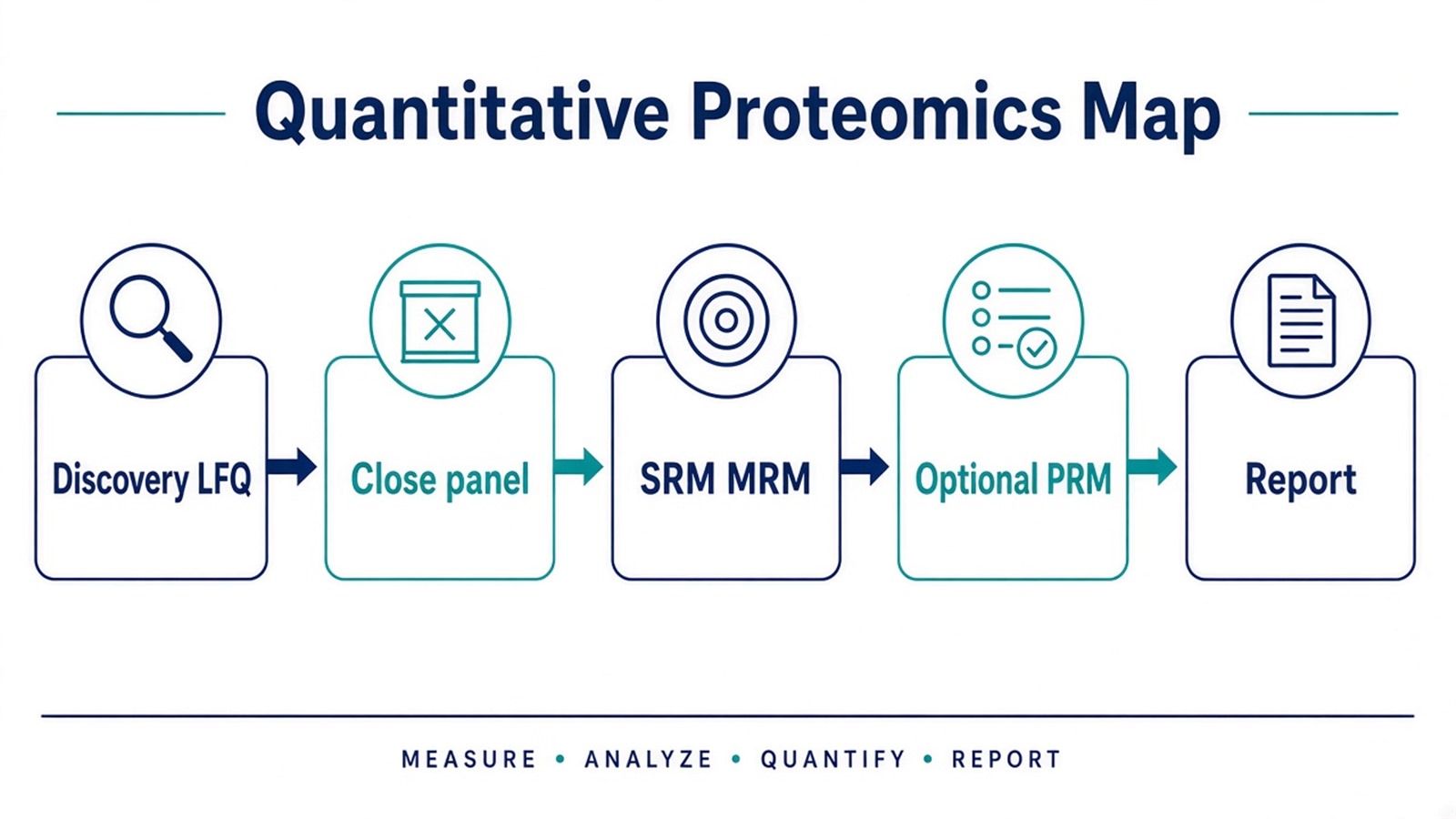
Figure 1. SRM sits after list freeze in the quantitative proteomics map; discovery and absolute calibration remain separate blocks when claim units differ.
Parameters That Must Be Locked Across the Quantitative Path
Layer |
Parameter that must be declared |
Failure mode if ignored |
|---|---|---|
Naming |
SRM or MRM as selected reaction monitoring |
Single-reaction wording without a transition list |
Stage |
Discovery versus targeted versus absolute |
One file used for every claim |
Panel |
Peptide list version and protein mapping |
Moving targets mid cohort |
Prep |
Matched digest and cleanup |
Peptide-pool shift as biology |
Transitions |
Precursor, products, dwell, collision energy |
Neat-standard methods fail in matrix |
LC |
Gradient, column, and load |
Retention windows miss peaks |
SIS |
Spike step aligned to claim |
Relative peaks read as concentration |
QC |
Pools, blanks, and bracket pattern |
Undetected batch drift |
Contrast |
Frozen before peak review |
Post hoc arm relabeling |
Handoff |
Discovery IDs mapped to targeted peptides |
Orphan candidates without trace |
Limits follow the same table. SRM does not profile the proteome. High sensitivity claims do not replace matrix-matched pilots. Immuno-enrichment, when used, must apply to every contrast arm. Clinical diagnosis, disease progression, or therapeutic efficacy language needs separate validation design beyond the quantitative table.
How to Choose SRM Within Quantitative Proteomics Projects
Use list status, matrix pilot, claim unit, and stage together.
Project need |
Route that often fits |
Recheck before committing |
|---|---|---|
Open protein list |
Discovery LFQ or DIA first |
SRM on unnamed proteins |
Closed peptides, clean transitions |
SRM or MRM |
Force PRM without interference |
Transition ratios unstable in matrix |
PRM subset or hybrid panel |
Whole-panel rebuild without pilot |
Amount units required |
SRM or PRM with SIS and curve |
Light-only SRM as concentration |
Search term single reaction monitoring |
Correct to selected reaction monitoring |
Build method under wrong name |
Metabolite or residue question |
Separate small-molecule assay |
Peptide protein-inference rules |
Biomarker validation intent |
Targeted panel plus validation design |
Discovery or SRM table as clinical test |
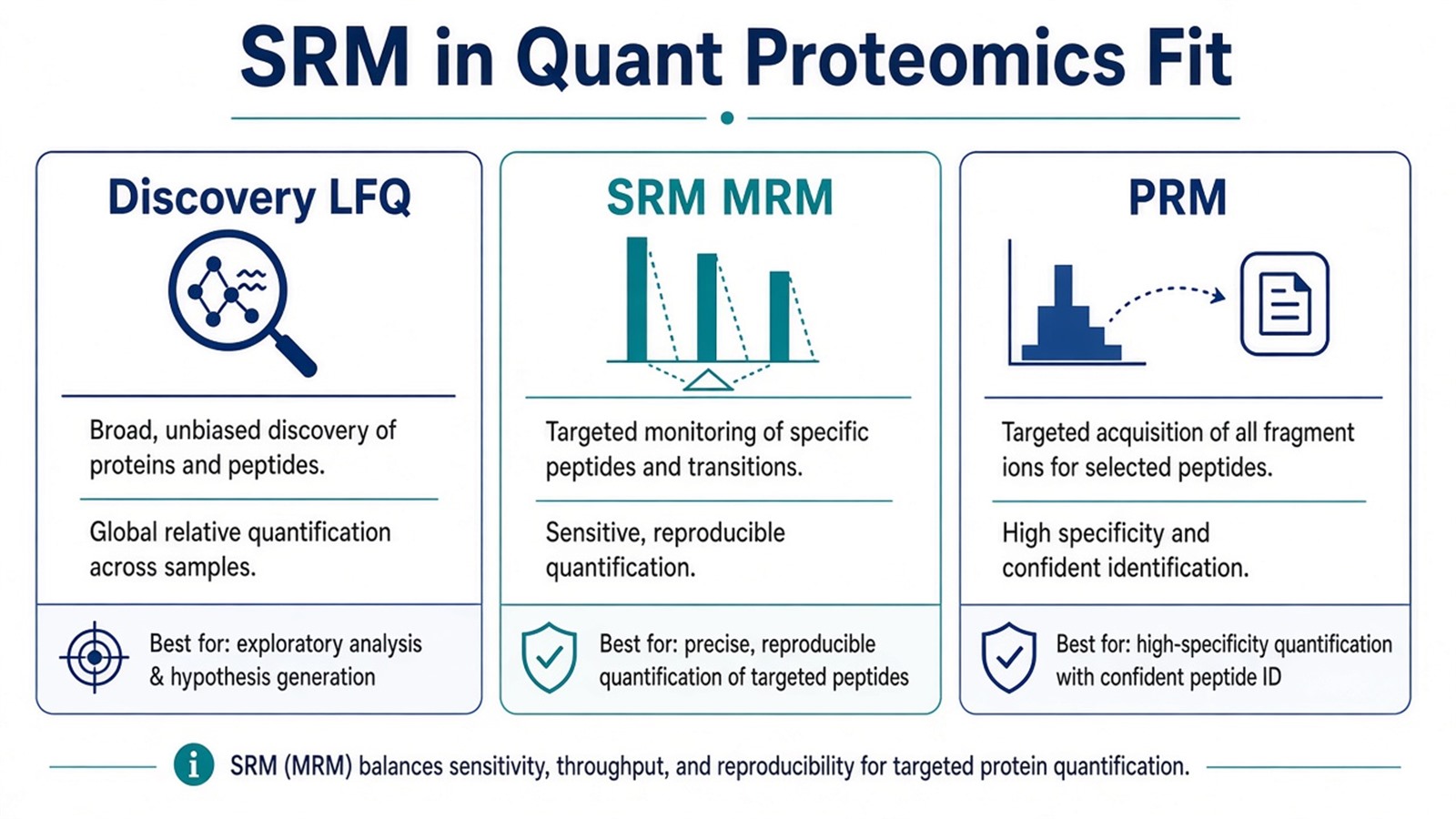
Figure 2. Place SRM after list freeze for relative targeted work; keep discovery or PRM when the list is open or transitions fail matrix pilots.
Teams with reporting goal, list status, and matrix notes can review MtoZ Biolabs SRM-MRM Quantitative Proteomics Services when SRM or MRM is declared in the project record.
Frequently Asked Questions
1. Is single reaction monitoring the same as selected reaction monitoring?
In proteomics project language, the established term is selected reaction monitoring. Intake that says single reaction monitoring should be mapped to SRM or MRM and documented that way in the methods record.
2. Is SRM the same as MRM?
Yes for most targeted peptide briefs. Both name scheduled precursor-product monitoring on triple quadrupole LC-MS/MS. Lock one name and one transition list version.
3. Can SRM replace discovery quantitative proteomics?
No. Discovery nominates candidates. SRM measures a frozen shortlist. Mixing those intents on one file splits the analysis record.
4. Does SRM cover metabolomics on this page?
No. This page places SRM inside peptide quantitative proteomics. Metabolite SRM uses different analytes, libraries, and claim units.
5. When should a project move from SRM to PRM or back to discovery?
Move to PRM when matrix-matched pilots still show unstable transitions. Return to discovery when the protein list is not yet closed.
MtoZ Biolabs can discuss quantitative proteomics route choice when reporting goal, panel status, and pretreatment parity are documented.
If further evaluation of SRM versus PRM, SIS calibration, or discovery-to-targeted handoff is needed, project details can be submitted for a feasibility review.
Reference
- V. Lange, P. Picotti, B. Domon, R. Aebersold (2008). Selected reaction monitoring for quantitative proteomics: a tutorial. Mol. Syst. Biol., 4, 222. https://doi.org/10.1038/msb.2008.61
- A.C. Peterson, J.D. Russell, A.A. Klammer, P.F. Doubleday, H. Liu, J.N. Anderson, M.J. MacCoss (2012). Parallel reaction monitoring for high resolution and high mass accuracy quantitative, targeted proteomics. Mol. Cell. Proteomics, 11, 1475-1488. https://doi.org/10.1074/mcp.O112.020271
- S.A. Gerber, J. Rush, O. Stemman, M.W. Kirschner, S.P. Gygi (2003). Absolute quantification of proteins and phosphoproteins from cell lysates by tandem MS. Proc. Natl. Acad. Sci. U.S.A., 100, 6940-6945. https://doi.org/10.1073/pnas.0832254100
- M. Bantscheff, S. Lemeer, H.U. Haab, B. Kuster (2012). Quantitative mass spectrometry in proteomics: a critical review. Anal. Bioanal. Chem., 404, 939-965. https://doi.org/10.1007/s00216-012-5892-4
- J. Cox, M.Y. Hein, C.A. Luber, I. Paron, M. Mann (2014). Accurate proteome-wide label-free quantification by delayed normalization and maximal peptide ratio extraction, termed MaxLFQ. Mol. Cell. Proteomics, 13, 2513-2526. https://doi.org/10.1074/mcp.M113.031031
