



A quantitative proteomics heatmap is a data-analysis visualization that displays relative protein abundance across samples after the quantitative matrix has already been quality-checked, normalized, and filtered. Rows are usually proteins or peptides, columns are samples or channels, and color encodes a declared scaled value such as a row-wise Z-score. Hierarchical clustering can reorder rows and columns to reveal co-varying patterns, but clustering is exploratory pattern discovery, not a substitute for differential testing. The heatmap answers how selected proteins group after the analysis rules are fixed. It does not invent missing values, repair batch confounding, or convert relative intensities into absolute concentration.
Researchers who already have a quantitative matrix or need figure-ready analysis support can also review the MtoZ Biolabs Proteomics Bioinformatics Analysis Service for project-specific analysis planning.
What the Heatmap Is Doing in the Analysis Pipeline
In label-free quantification (LFQ), data-independent acquisition (DIA), or tandem mass tag (TMT) projects, the heatmap sits after identification, quantification, and normalization. Its job is communication and pattern review for a defined protein subset, often differentially abundant proteins or a curated pathway panel.
Analysis object |
Typical meaning in the heatmap |
Common mistake |
|---|---|---|
Input matrix |
Protein- or peptide-level relative quantities |
Plotting raw search scores as abundance |
Color scale |
Declared transformation (log, Z-score, centered log2 ratio) |
Mixing unscaled intensities with Z colors |
Row order |
Protein similarity under a distance metric |
Treating cluster membership as a p-value |
Column order |
Sample similarity or fixed experimental groups |
Letting clustering hide known batch blocks |
Protein subset |
Filtered candidates or panel of interest |
Dumping the entire proteome without filters |
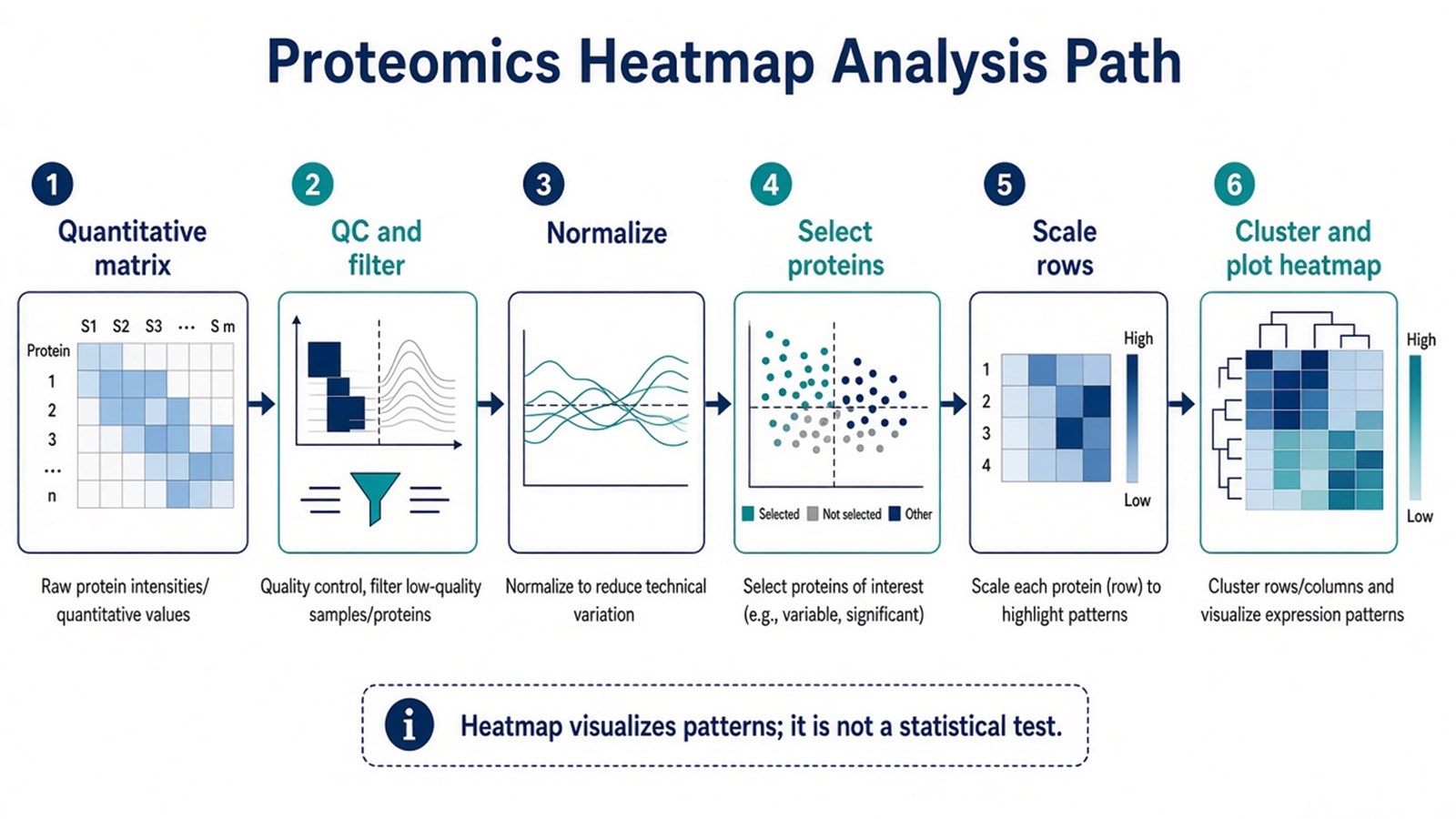
Figure 1. A proteomics heatmap is built after QC and normalization; it visualizes selected abundance patterns and is not itself a statistical test.
Declare the matrix, filter, scaling, and clustering rules before interpreting color blocks as biology.
How to Create the Heatmap: Analysis Steps
1. Start from a quantitative matrix with metadata
Build a table of proteins (or peptides) by samples. Attach group labels, batch IDs, and channel maps for TMT. Prefer protein-level values that already passed identification filters and peptide-support rules used in the project record.
2. Complete QC before plotting
Review missingness, intensity distributions, principal component analysis (PCA) or similar global structure, and known batch factors. A heatmap cannot repair a confounded run order or a swapped sample annotation. If normalization assumptions still need selection, see How to Normalize Data in Label-Free Quantitative Proteomics?.
3. Filter to a defensible protein set
Common choices are differentially abundant proteins under a stated fold-change and false discovery rate (FDR) rule, proteins from a predefined pathway panel, or proteins with acceptable missing-value rates. Plotting tens of thousands of unfiltered proteins usually produces an unreadable map and invites overinterpretation.
4. Transform and scale with an explicit rule
Log-transform skewed intensities when appropriate. Row-wise Z-scores emphasize within-protein pattern across samples and are common for clustering heatmaps. Do not mix absolute-looking color legends with relative-only matrices. TMT channel ratios and LFQ intensities remain relative unless a calibrated standard assay was used.
5. Choose distance, linkage, and whether to cluster samples
Hierarchical clustering typically uses a distance such as Euclidean or correlation distance and a linkage method such as complete or average. Clustering samples can reveal unexpected subgroups; keeping the experimental group order can better show contrasts the study was designed to test. Record both the metric and the choice.
6. Plot, annotate, and archive the analysis record
Generate the heatmap in software such as R (for example ComplexHeatmap or pheatmap) or Python (for example seaborn clustermap). Add color bars for group and batch, a color-scale legend that matches the scaling rule, and a methods note listing filters and software versions. Tools change the rendering syntax; they do not change the scientific claim.
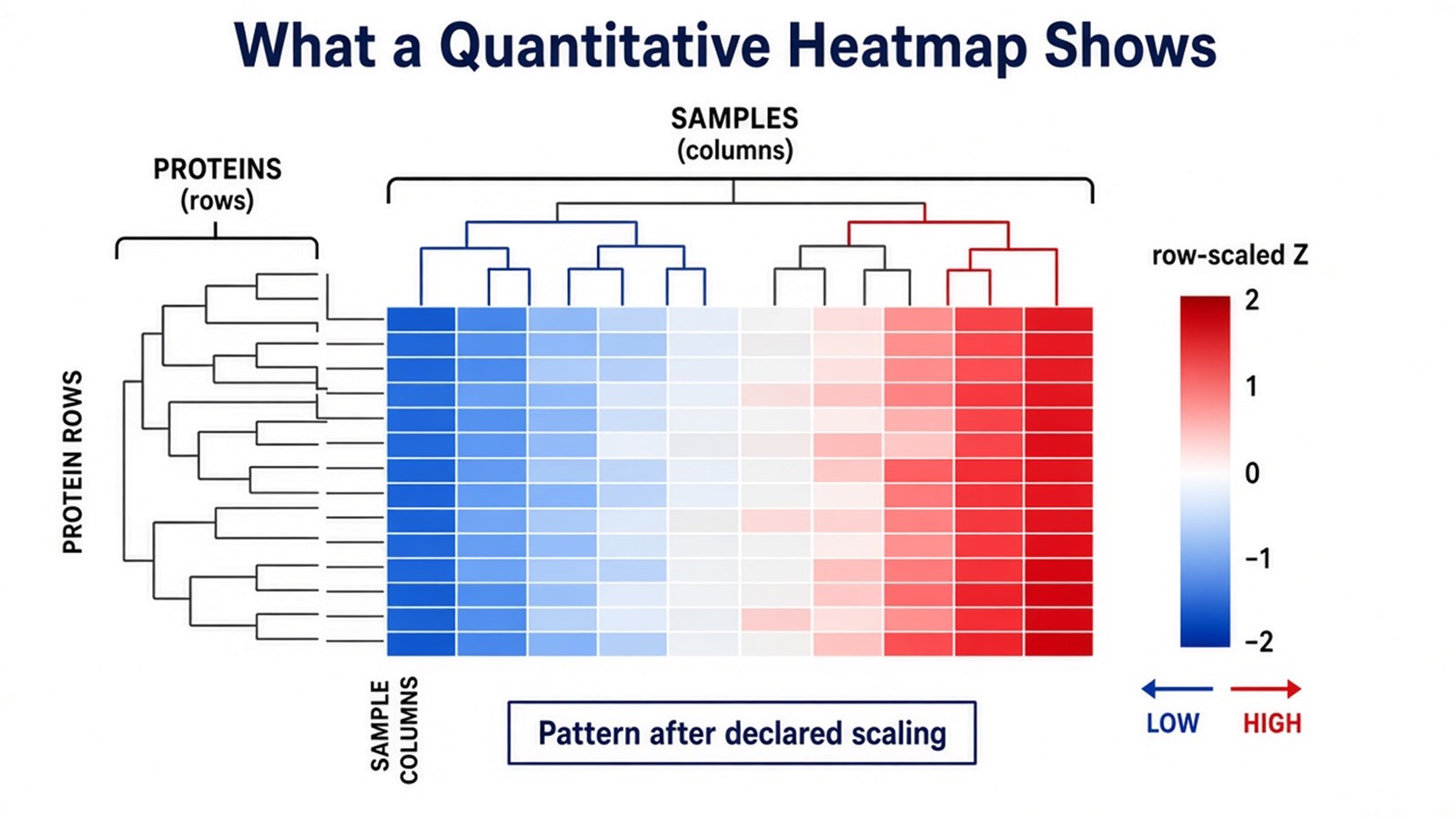
Figure 2. Color encodes a declared scaled abundance; dendrograms show similarity patterns under the chosen distance and linkage rules.
Judgment Criteria: When a Heatmap Fits
Analysis need |
Heatmap often fits |
Prefer another view first |
|---|---|---|
Goal |
Show co-variation of a filtered protein set across samples |
Rank single-protein significance |
Matrix status |
QC, normalization, and filters already declared |
Raw search output still unstable |
Sample question |
Pattern blocks and subgroup structure |
Global batch/group separation summary |
Better companion plot |
Pair with volcano for DE triage and PCA for global structure |
Heatmap alone as the only evidence |
Claim type |
Exploratory visualization of relative patterns |
Absolute concentration or diagnostic cutoff |
Prefer a heatmap when a filtered candidate list needs pattern communication. Prefer a volcano plot when the question is which proteins pass DE thresholds. Prefer PCA when the question is global group or batch structure. Prefer pathway enrichment tables when the question is overrepresentation, remembering enrichment is not pathway proof.
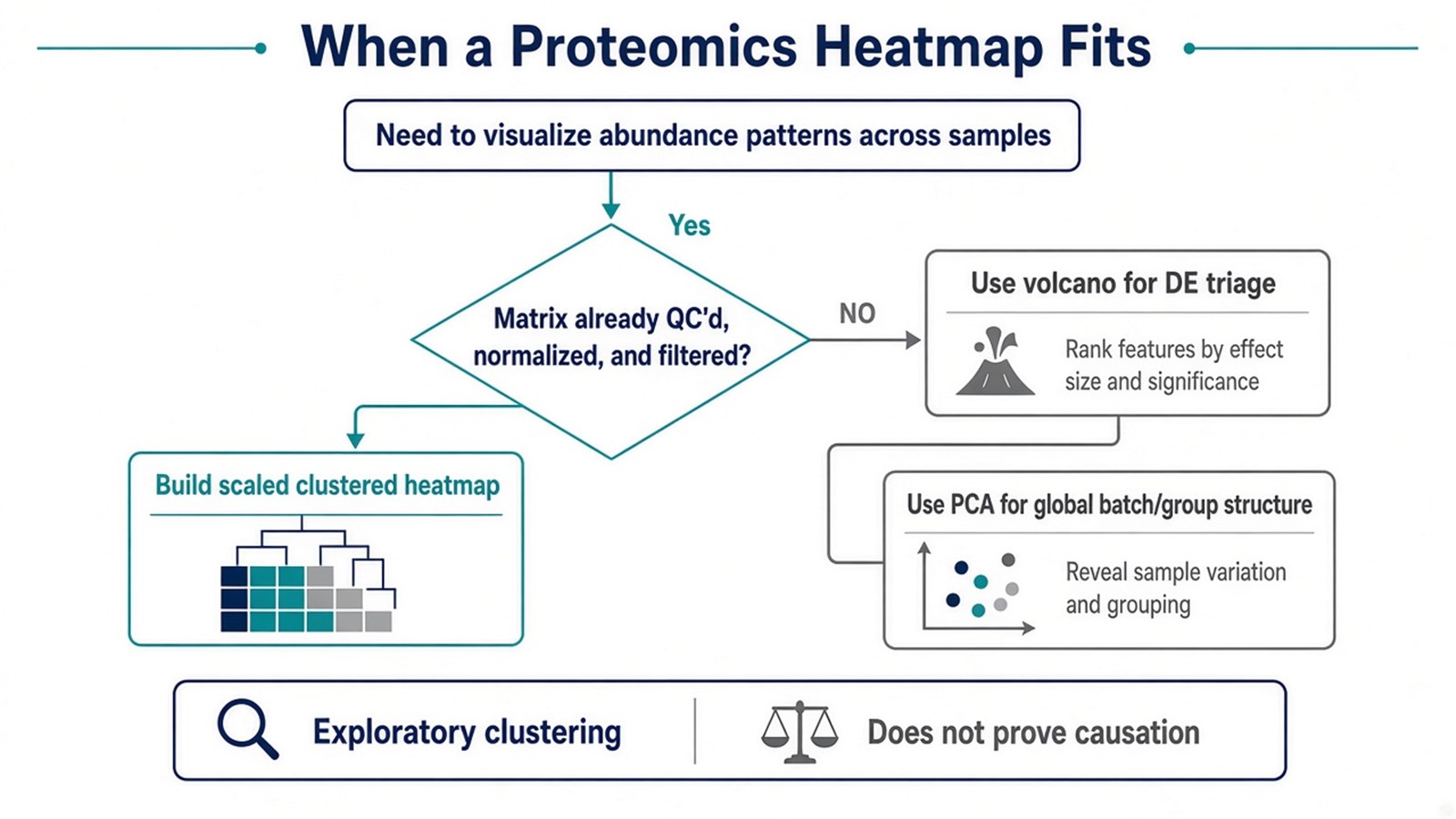
Figure 3. Build a heatmap after the matrix is analysis-ready; use volcano or PCA when those questions come first.
Limits and Application Boundaries
Clustering will always find some structure, including noise-driven blocks if filters are weak. Missing-value imputation can create artificial similarity. Row scaling can make weak noisy proteins look as dramatic as strong ones. A beautiful heatmap does not validate peptide identity, correct ratio compression in TMT, or establish clinical cutoffs.
Typical uses are publication figures for differential protein panels, QC review of whether replicates co-cluster, treatment or time-course pattern inspection, and communication of curated pathway panels after relative LFQ, DIA, or TMT quantification. Absolute amount claims still require matched standards and a calibration model outside ordinary heatmap coloring.
Once the quantitative matrix, filters, scaling, and figure claim are defined, the project can be evaluated as a proteomics data-analysis visualization task. Researchers can review the MtoZ Biolabs Proteomics Bioinformatics Analysis Service for analysis planning and figure-ready reporting. For relative quantification upstream of visualization, see the Relative Protein Quantitative Service.
Frequently Asked Questions
1. Is a heatmap a statistical test for differential expression?
No. Differential testing uses stated models and multiple-testing control. The heatmap visualizes patterns after those decisions, or for a curated panel.
2. Should I plot the whole proteome?
Usually no. Unfiltered whole-proteome maps are hard to read and easy to overinterpret. Filter by DE rules, missingness, or a predefined panel.
3. Are Z-scores required?
No. Z-scores are common for row-pattern visualization. Centered log2 ratios or other declared scales can fit better depending on the matrix. The scale must match the legend.
4. Can a heatmap prove that replicates are good?
Replicates that co-cluster are supportive but not definitive QC. Pair the figure with missingness, PCA, and normalization checks.
5. Does software choice (R vs Python) change the biological claim?
No. Software changes implementation. The claim depends on the matrix, filters, scaling, clustering rules, and accompanying statistics.
Reference
- J. Cox, M.Y. Hein, C.A. Luber, I. Paron, N. Nagaraj, M. Mann (2014). Accurate proteome-wide label-free quantification by delayed normalization and maximal peptide ratio extraction, termed MaxLFQ. Mol. Cell. Proteomics, 13, 2513-2526. https://doi.org/10.1074/mcp.M113.031591
- Y. Benjamini, Y. Hochberg (1995). Controlling the false discovery rate: a practical and powerful approach to multiple testing. J. R. Statist. Soc. B, 57, 289-300. https://doi.org/10.1111/j.2517-6161.1995.tb02031.x
